Simplify Your VPC Architecture with AWS Regional NAT Gateways

Are you running workloads across multiple Availability Zones (AZ) that need internet access? If you're following AWS best practices for high availability, chances are you have NAT Gateways deployed in each AZ, each one sitting in a public subnet, each with its own route table configuration. It works, but it's a lot to manage.
AWS has introduced Regional NAT Gateways to simplify this. Let's see what they can do.
Yup, they are another way to tackle this issue. However, if you're already down that path, you probably already know what a AWS Regional NAT Gateway is for 😄.
The Traditional Approach
With the traditional (now called "zonal" - look out for that on the next AWS exam) approach, each NAT Gateway is configured in a single Availability Zone. For high availability, you need a NAT Gateway in each AZ where you have private resources. You also need a public subnet for each "zonal" NAT Gateway per AZ, and you need route tables per AZ pointing to the local NAT Gateway in its respective AZ.
Every time you expand to a new AZ, you're back to creating NAT Gateways, public subnets, and updating route tables. Miss a step and your traffic either fails or takes an cross-AZ path (which isn't free at $0.02/GB).
What Regional NAT Gateways Do Differently
- A Regional NAT Gateway is a single NAT Gateway that automatically spans multiple Availability Zones.
- One thing that is pretty cool is unlike zonal NAT Gateways, a Regional NAT Gateway doesn't need a public subnet. This reduces the chance of accidentally placing private resources in subnets with public connectivity.
- It has its own route table that comes pre-configured with a route to the internet gateway.
- It has a single NAT ID across all AZs. So you can also use the same route table entry for private subnets across different AZs, all pointing to the one Regional NAT Gateway.
How It Scales
The Regional NAT Gateway detects when you have resources in an Availability Zone and expands there automatically. When your workloads leave an AZ, it contracts. No provisioning required.
Regional NAT Gateways actively monitor your VPC for network interfaces (ENIs). When the NAT Gateway detects an ENI in a new Availability Zone, it automatically expands to that zone to maintain zonal affinity.
The same works in reverse. If an AZ no longer has active workloads, the Regional NAT Gateway contracts from that zone. Like a lot of other AWS services, the Regional NAT Gateway does not scale down to zero and will maintain deployment in at least 1 AZ at all times.
Higher Limits
Regional NAT Gateways come with increased capacity. You can associate up to 32 IP addresses per Availability Zone (compared to 8 for zonal). Each IP address supports up to 55,000 concurrent connections to a unique destination, so you've got a lot more room if you're pushing serious traffic.
Automatic vs Manual Mode
Regional NAT Gateways support two modes:
- Automatic mode (default/recommended): AWS manages IP address allocation and AZ expansion for you. This is the simplest option.
- Manual mode: You control IP address assignments and which AZs the NAT Gateway operates in. Use this if you need to preserve specific IP addresses for allowlisting.
Let's Create a Regional NAT Gateway
Setting one up is straightforward.
- Open the VPC console and navigate to NAT gateways
- Click Create NAT gateway
- For Availability mode, select Regional
- Select your VPC.
- Complete the remaining configuration and click Create NAT gateway
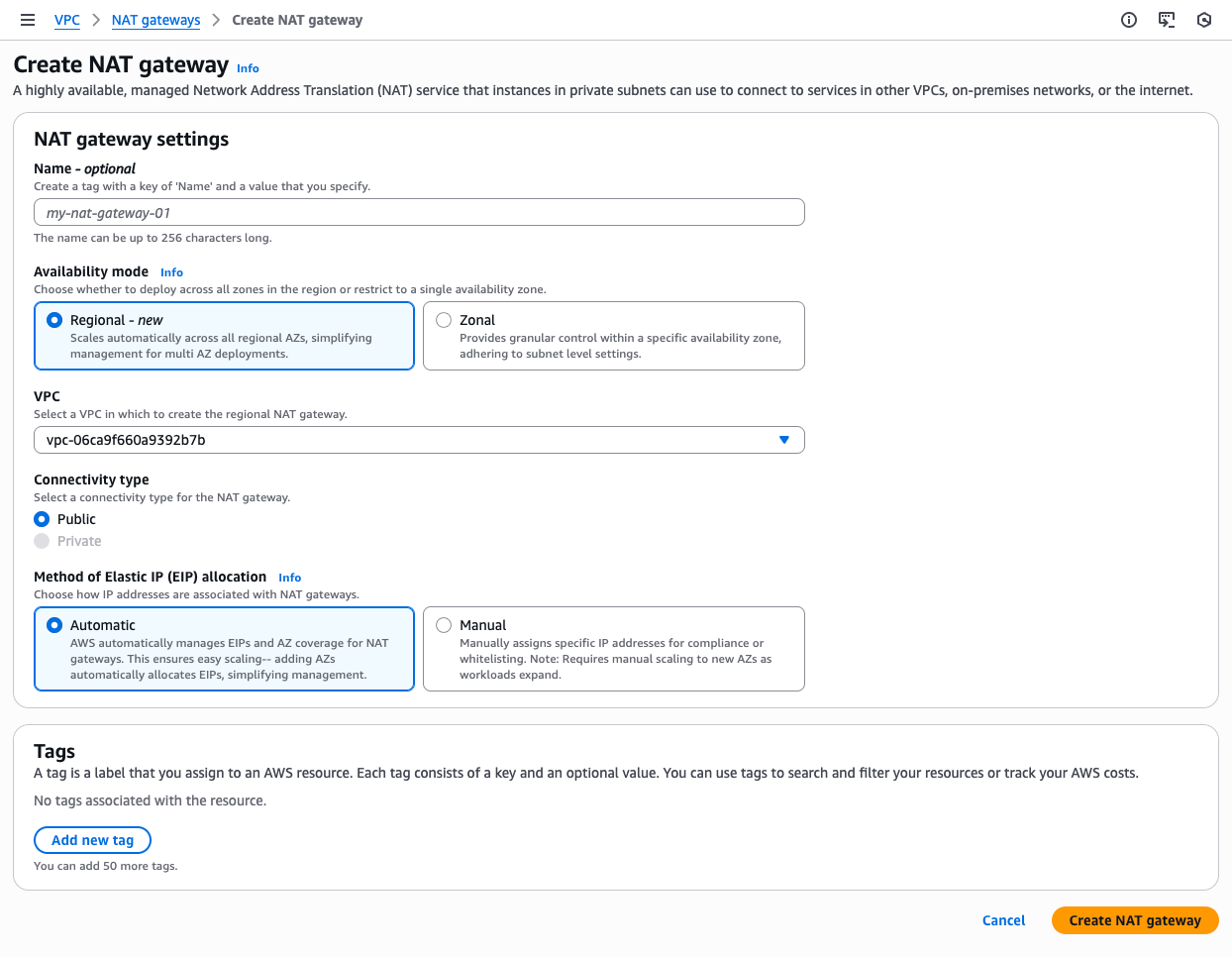
That's it. Once the NAT Gateway is available, update your private subnet route tables to point to it. You can use the same route table across subnets in different AZs.
Pricing
Here's where you need to pay attention. Regional NAT Gateways are charged per hour per Availability Zone they're active in.
In Sydney (ap-southeast-2) for example:
- Hourly charge: $0.059 per hour per AZ
- Data processing: $0.059 per GB
So if your Regional NAT Gateway is running across three AZs, you're paying $0.059 × 3 = $0.177 per hour. That's the same as running three separate zonal NAT Gateways.
The savings come from operational overhead. You're managing one resource instead of three, and you don't need public subnets just to host NAT infrastructure.
The good news is pricing automatically adjusts. If the Regional NAT Gateway contracts from an AZ, you stop being charged for that AZ.
When to Stick with Zonal
Regional NAT Gateways don't support private connectivity. If you're using private NAT Gateways to connect to other VPCs or on-premises networks (without going through the internet), stick with zonal.
For public NAT use cases, Regional NAT Gateways are generally the better choice.
Migrating from Zonal to Regional
Already running zonal NAT Gateways? You have two migration paths depending on whether you need to keep your existing IP addresses.
Both migration paths will cause an outage of some type. Plan to do this during a maintenance window.
Option 1: New IP Addresses
Use this if your outbound IPs aren't allowlisted anywhere.
- Create a new Regional NAT Gateway in your VPC
- Update your private subnet route tables to point to the Regional NAT Gateway
- Delete the old zonal NAT Gateways
Outage: This resets existing connections when the routes are updated.
Option 2: Preserve Existing IP Addresses
Use this if you need to keep the same Elastic IP addresses (for example, if they're allowlisted by external services).
- Delete your existing zonal NAT Gateways to release their Elastic IP addresses
- Create a new Regional NAT Gateway using the released EIPs
- Update your route tables to point to the Regional NAT Gateway
Outage: This requires a maintenance window because traffic is interrupted between deleting the old gateways and creating the new one.
Go do it
Network infrastructure regularly gets forgotten about in the cloud world after its been deployed as long as it keeps working, so use this as a opportunity to update your stacks.
With Regional NAT Gateways you get automatic scalable high availability without managing NAT Gateways per AZ, and you can get rid of public subnets that generally only existed to host NAT infrastructure.
If you're setting up a new VPC, Regional NAT Gateways should be your default for public NAT. If you're running existing zonal NAT Gateways, the migration is straightforward, just plan for a brief outage.
Here is the AWS documentation on Regional NAT Gateways if you need to know more.



Comments ()